Blogging Without Maintenance: How to Write More and Tinker Less

Here's the thing: you didn't start a blog to become a part-time sysadmin. You started it to share ideas, build an audience, and maybe make some money. But if you're on WordPress, there's a decent chance you're spending more time updating plugins than polishing paragraphs. That's not a you problem. That's a platform problem.
Blogging without maintenance means choosing a platform that handles security, speed, backups, and updates automatically, so you can focus on writing instead of troubleshooting. In 2026, that's not just a luxury. It's a competitive advantage.
How Much Time Does WordPress Maintenance Really Take?
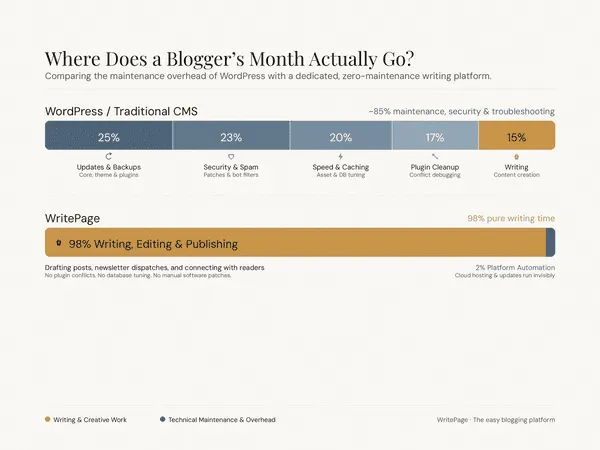
Honestly, most people get this wrong. They think maintenance is a "quick 20-minute checkup." The reality? A typical WordPress blog needs 5 to 10 hours of maintenance per month if you're doing it yourself. That's not me guessing. That's the consensus across WordPress maintenance agencies and site owners in 2026.
Here's what those hours actually look like:
Plugin updates (weekly): 15-30 minutes to check, backup, update one at a time, and verify nothing broke.
Security scans (monthly): 20-30 minutes to review logs and patch vulnerabilities.
Speed checks (monthly): 10-20 minutes in PageSpeed Insights, plus time to fix issues.
Database cleanup (monthly): 10-20 minutes removing post revisions and spam.
The "oh no" moments (unpredictable): Anywhere from 1 hour to a full weekend when an update breaks your layout, a plugin conflict crashes your site, or your hosting throws a fit.
And here's the kicker: plugin conflicts affect over 73% of WordPress websites annually. In 2025 alone, over 11,000 plugin vulnerabilities were disclosed, up 42% from the previous year. Attackers start scanning for exploits within 5 hours of disclosure. The average site owner? They patch 14 days later. That gap is where blogs get compromised.
If your time is worth even $50 an hour, that maintenance load costs you $3,000 to $6,000 a year in opportunity cost. You could have written a book in those hours.
Why Do WordPress Sites Break After Updates?
You've been there. You click "Update All," grab coffee, and come back to a white screen. WordPress sites break after updates because of a fundamental structural issue: there's no lock file for plugins. When Plugin A updates and changes its API, Plugin B (which depended on the old behavior) breaks. Neither developer is necessarily wrong. They just have no way to coordinate.
Other common breakage points:
Theme conflicts: Your theme expects old WordPress functions that no longer exist.
PHP version mismatches: WordPress 6.9 in 2026 pushes toward PHP 8.3+, but thousands of "zombie plugins" still rely on deprecated code.
Resource exhaustion: Too many plugins running unoptimized database queries slow your site to a crawl.
Hosting issues: Cheap shared hosting doesn't always play nice with newer WordPress requirements.
The result? You're not just maintaining your blog. You're firefighting. And every hour spent fixing something is an hour not spent creating something.
What Is a Low-Maintenance Blog Platform?
A low-maintenance blog platform handles the technical infrastructure for you. That means:
Automatic updates for core software, themes, and security patches.
No plugin ecosystem to manage, conflict-test, or patch.
Built-in speed optimization. No caching plugins, image optimizers, or CDN configuration needed.
Managed security with automated backups and SSL.
Writing-first design that gets out of your way.
The goal isn't to dumb down blogging. It's to remove the friction between your idea and your audience.
Which Blog Platform Has the Least Maintenance?
Here's an honest comparison of what you're signing up for:
Feature | WordPress.org | WordPress.com | Ghost | Squarespace | Wix | WritePage |
|---|---|---|---|---|---|---|
Monthly maintenance time | 5-10 hrs | 2-4 hrs | ~0 hrs | ~0 hrs | ~0 hrs | ~0 hrs |
Plugin management | Manual | Partial | None | None | None | None |
Custom domain & SEO control | Full | Limited (paid) | Full | Limited | Limited | Full |
True ownership | Yes | Partial | Yes | No | No | Yes |
Built for writers | Sort of | Sort of | Yes | No | No | Yes |
Speed out of the box | Needs tuning | Okay | Fast | Good | Okay | Fast |
Monthly cost | $25-75+ | $4-25 | $9-199 | $16-99 | $17-159 | Free tier available |
Best for: Ghost is excellent for publishers and membership sites. Squarespace is beautiful for portfolios. Wix is fine for small local businesses. But if you're a solopreneur or content creator who wants a blog that ranks, loads fast, and never demands a Sunday afternoon troubleshooting session, you need something built specifically for writers.
That's where WritePage comes in.
How WritePage Eliminates Blog Maintenance
WritePage was built by people who actually blog. We were tired of the same cycle: publish a post, feel good, then spend the next week tweaking plugins and panicking about update notifications. So we built the platform we wished existed.

Here's what WritePage handles automatically:
Security & SSL: Managed certificates and threat monitoring. No configuration needed.
Speed optimization: CDN, image compression, and caching are built in. Your pages load fast without you touching a setting.
Backups: Continuous, automatic backups you never have to think about.
SEO fundamentals: Clean URLs, meta tags, sitemaps, and structured data work out of the box.
No plugins: Everything is integrated. There are no updates to apply, no conflicts to debug, no compatibility tests to run.
You sign up, connect your domain, and write. That's it.
Who Is Maintenance-Free Blogging Best For?
This isn't for everyone. If you're a developer who loves tinkering with PHP and custom themes, you might find a fully managed platform limiting. But maintenance-free blogging is perfect if you:
Run your blog as a side hustle while working a full-time job.
Are a solopreneur who'd rather create content than manage infrastructure.
Have lost weekends to plugin updates and white screens of death.
Want to publish consistently without technical friction.
Care about SEO and site speed but don't want to become an expert in either.
If that sounds like you, the question isn't whether you can afford to switch. It's whether you can afford not to.
FAQ: Blogging Without Maintenance
Can I really run a blog without doing any maintenance?
Yes, if you choose the right platform. Hosted platforms like WritePage, Ghost, and Squarespace handle security, updates, backups, and speed optimization automatically. You focus on content; they focus on infrastructure.
Will a low-maintenance blog hurt my SEO?
Not if the platform is built right. WritePage and Ghost both deliver fast load times, clean code, and full SEO control, often outperforming poorly optimized WordPress sites. Google's Core Web Vitals reward speed and stability, which managed platforms provide by default.
How much does a zero-maintenance blog cost?
It depends. Ghost starts at $9/month. Squarespace starts at $16/month. WritePage has a free tier and paid plans that scale with you. Compare that to WordPress.org, where hosting ($25+/mo), premium plugins ($200-500/yr), and emergency developer fixes ($100-200/hr) add up fast. The real cost of WordPress is your time.
What happens to my existing WordPress content?
Most modern platforms, including WritePage, offer migration tools or services to import your WordPress posts, images, and metadata. You won't lose your content or your SEO history.
Is WordPress still worth it in 2026?
WordPress is powerful and flexible. If you need complex custom functionality, WooCommerce, or a massive multi-author publication, it's still the best choice. But for solo bloggers and content creators who just want to write and rank, the maintenance overhead is often overkill. In 2026, simpler alternatives can deliver 90% of the results with 10% of the hassle.
The Bottom Line
You have a finite number of hours to create. Every minute spent on maintenance is a minute stolen from your best work. In 2026, there is no technical reason a blogger should be patching plugins, optimizing databases, or debugging PHP errors.
Blogging without maintenance isn't about being lazy. It's about being smart with your time. Choose a platform that respects both your writing and your schedule.
Ready to write more and tinker less? Try WritePage free today.